If you’ve ever stood fumbling through a pocket or purse at 2 a.m., keys clutched in one hand while a grocery bag spills out the other, you already know the frustration of traditional locks. That’s the exact moment I watched my old deadbolt give out—turning stiff as a rock when my hands were full, leaving me locked out in the rain for 20 minutes. That frustration’s why I got into the smart lock game: I’m a supplier, not some suits-and-slide-decks type, so I’ve spent years testing these things for myself, asking contractors how they hold up on rental properties, and listening to homeowners yell about the messes cheaper models make. Smart Lock
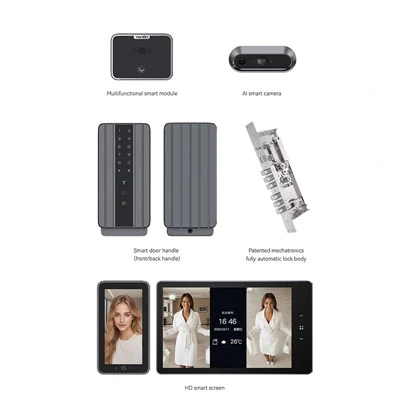
Let’s cut to the basics: what is a smart lock? It’s not some science fiction gadget that lives only in spy movies. It’s an electronic door lock that replaces, or works alongside, a traditional mechanical deadbolt—with features you won’t find on a brass lock from the hardware store down the street. Unlike a regular lock that only opens with a physical key, a smart lock lets you unlock your door using a smartphone app, a keypad code, a fingerprint scanner, a key fob, or even voice commands, depending on the model. Some connect to Wi-Fi, others work only via Bluetooth, and a few use both for flexibility.
I get it—“smart” can feel like a buzzword. But let’s break down the tech that makes them work, because that’s where a lot of cheap suppliers skimp. Most entry-level smart locks use Bluetooth Low Energy (BLE) to communicate with your phone. That’s the one that uses way less battery than old Bluetooth, so you won’t replace AA batteries every two weeks. Higher-end models add Wi-Fi, so you don’t have to be standing right next to your door to lock or unlock it—you can do it from your office, or text your kid a code to get in after soccer practice. Some even use NFC, like the tap feature on your phone, so a quick tap of your phone on the lock’s keypad does the trick.
Then there’s the biometric stuff—fingerprint scanners, which are super handy for households with kids or renters who don’t want to fumble with codes. But here’s a tip I learned installing these for 100+ properties: cheap fingerprint scanners will fail if your fingers are wet, or if someone’s fingerprints are worn from manual labor. The good ones we supply use 3D biometrics, not just a flat photo sensor, so they work even if your hands are a little damp, and they won’t get tricked by a printed fingerprint copy.
Let’s talk about the core difference between a smart lock and a regular lock: control. With a traditional lock, you give someone a key, and you have no way to track if they used it—until they give it back, if they ever do. With a smart lock, you can generate temporary codes that expire after an hour, a day, or a week. Let’s say you’re hiring a cleaner: you send them a code for Tuesday between 9 a.m. and 12 p.m., and it won’t work after that. If you have a dog walker coming every other week, you can set a recurring code. That’s not a fancy perk—it’s security, because you don’t have to worry about someone copying your key and wandering around months later.
I know security is the big question people ask. “Can smart locks get hacked?” It’s a fair question, and it’s why I only stock models that meet industry standards—like AES-128 encryption, which is the same stuff banks use for online transactions. Early smart locks had issues with flimsy Wi-Fi connections, so if your internet cut out, you couldn’t get in. But modern models have a built-in backup: most have a physical keyhole, just like a regular lock, and some even have a battery backup that works for months if the lock’s batteries die. We also test every model for “relay attacks,” which are a common hack where someone tricks your phone and the lock into thinking they’re next to the door when they’re not. The good ones we supply have anti-relay attack tech, so that doesn’t work.
There are different types of smart locks, too, and not all are right for every door. Let’s start with retrofit smart locks—these are the easiest to install, because they replace your existing deadbolt without changing the door or the hole in it. Most can be installed in 10 minutes with a screwdriver, no electrician needed, which is why they’re the bestseller for homeowners who don’t want to pay for a pro. Then there are smart deadbolts, which are standalone locks for doors that don’t have an existing deadbolt, or for rental properties where you want a separate lock. And there’s smart locks with handlesets, which combine a smart lock with a front door handle—great for new construction, or people who want to replace their entire entryway hardware in one go.
A lot of people still wonder if smart locks are worth the money, especially when a regular deadbolt costs $20 and a smart lock is $150. Let’s do the math. Last year, a customer told me their teen lost their keys twice in one month, and they had to pay a locksmith $80 each time to rekey the lock. That’s $160 just for keys—more than the cost of a basic smart lock, and now they don’t have to worry about lost keys at all. For landlords: I’ve had property managers tell me they cut their lock rekey costs by 70% after switching to smart locks, because they don’t have to rekey every time a tenant moves out. They just delete the old tenant’s code and make a new one. That’s a huge time saver, too—no more waiting around for a locksmith to show up between move-ins.
But here’s the catch: not all smart locks are created equal. I’ve seen cheap knockoffs that die after three months, or keypad codes that work for anyone who walks by, or apps that glitch and lock you out of your own house. That’s why as a supplier, I make sure every model I carry has 24/7 customer support—because when your lock dies at 10 p.m. on a Sunday, you don’t want to be waiting for a reply during work hours. We also test every lock in real-world situations: I’ve spent a week outside in the rain with a few models, left them in a hot car to simulate summer, dropped them on concrete, and tried to trigger every hack we could think of. If a lock fails any of those tests, we don’t supply it.
Let’s talk about common use cases, because that’s where smart locks shine. For families with young kids: you can set a “child lock” mode, so they can’t accidentally lock themselves out. For people who travel a lot: you can check the app to make sure your door is locked, and unlock it for a dog walker or house sitter when you’re abroad. For small businesses: a café can give part-time staff a temporary code that only works during their shift, and track exactly when they came and went. For people with disabilities: fingerprint scanners or voice control mean no more struggling with keys or a stiff deadbolt.
I’ll be honest: there are a few downsides, and I don’t sugarcoat that. If your Wi-Fi goes out, a Wi-Fi-enabled smart lock might not let you unlock it—though most have a backup code or physical key. And you have to remember to replace the batteries every 6 to 12 months, which is way less often than you think, but it’s still a chore. But compared to the alternatives, those are small trade-offs for the control and security you get.
If you’re still on the fence, let me leave you with this: smart locks aren’t just a fancy upgrade. They’re a shift in how you think about home security. Instead of relying on something you carry in your pocket (which you can lose, copy, or forget), they rely on things that are part of your daily life—your phone, your fingerprint, a code you can text to someone without handing over a physical key. That’s the reason I’ve been doing this for 8 years now: I’ve seen customers stop panicking about lost keys, landlords save thousands on lock changes, and families feel safer letting their kids come home from school alone.

If you’re a homeowner, a property manager, or a small business owner looking to make the switch, I’d love to talk through what’s right for your space. We can walk through the different models, the installation options, and the ways we can customize codes for your needs. Just reach out to us to schedule a procurement conversation, and we’ll help you find a smart lock that fits your budget and your lifestyle.
Steel Smart Doors References
- National Electronic Security Associates. (2022). Smart Lock Security Standards: A Guide for Residential and Commercial Properties. NESA Publications.
- Consumer Reports. (2023). Smart Lock Testing: Performance, Security, and User Satisfaction. Consumer Reports.
- International Residential Code. (2021). Appendix E: Electronic Locking Systems for Dwellings. ICC.
- Wireless Innovation Alliance. (2022). BLE and Wi-Fi Low-Power Connectivity for Smart Home Devices. WIA Technical Brief.
- Locksmith Ledger International. (2023). Smart Lock Adoption Trends for Residential and Rental Properties. Locksmith Ledger.
Guangdong Ap Tenon Sci. & Tech. Co., Ltd.
Guangdong Ap Tenon Sci. & Tech. Co., Ltd. is one of the most professional smart lock manufacturers and suppliers in China. With abundant experience, we warmly welcome you to wholesale advanced smart lock made in China here from our factory. Also, OEM service is available.
Address: No.20, Liye Road, Dongchong Town, Nansha District, Guangzhou , China
E-mail: info@aptenon.com
WebSite: https://www.tenondoorlock.com/
